

What is Ads.txt and Why It Matters
Ads.txt (Authorized Digital Sellers) is a simple text file that helps publishers declare who is authorized to sell their digital advertising inventory. Created by the IAB Tech Lab, it’s a crucial tool for
Preventing ad fraud: Stops unauthorized sellers from offering your inventory
Increasing revenue: Legitimate advertisers pay more for verified inventory
Building trust: Shows you’re a professional, transparent publisher
Meeting requirements: Many ad networks (including Google AdSense) require it
Understanding the “Ads.txt Not Found” Error
This error occurs when:
- 1 The ads.txt file doesn’t exist on your server
- 2 It’s placed in the wrong location
- 3 Server permissions block access
- 4 Caching issues prevent detection
- 5 URL structure problems
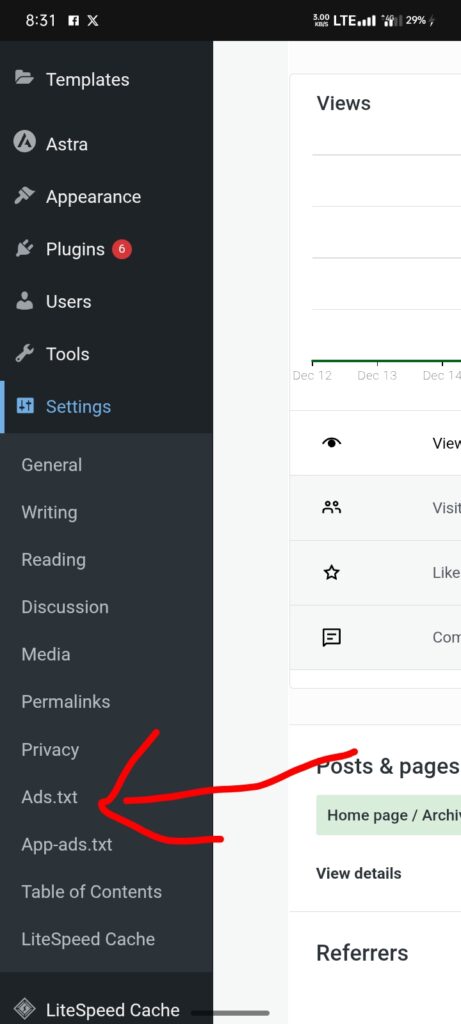
Step 1: Create Your Ads.txt File
For Google AdSense Users (Most Common): google.com, pub-0000000000000000, DIRECT, f08c47fec0942fa0
For Multiple Ad Networks:
google.com, pub-0000000000000000, DIRECT, f08c47fec0942fa0example.com, 12345, DIRECTanothernetwork.com, ABCD1234, RESELLER
Step 2: Upload to Correct Location
Critical Requirement: The file MUST be at your domain’s root level
Correct URL Structure:
· https://yourdomain.com/ads.txt ✓· https://yourdomain.com/public_html/ads.txt ✗· https://yourdomain.com/wordpress/ads.txt ✗
Step 3: Verify File Accessibility
Quick Test Methods:
1 Browser Test: Open yourdomain.com/ads.txt in any browser
2 Terminal/Command Prompt: “`bash
3 Online Validators:
· Google’s Publisher Center · ads.txt validator tools · SEO audit tools like Semrush, Ahrefs
Method A : Using Plugins
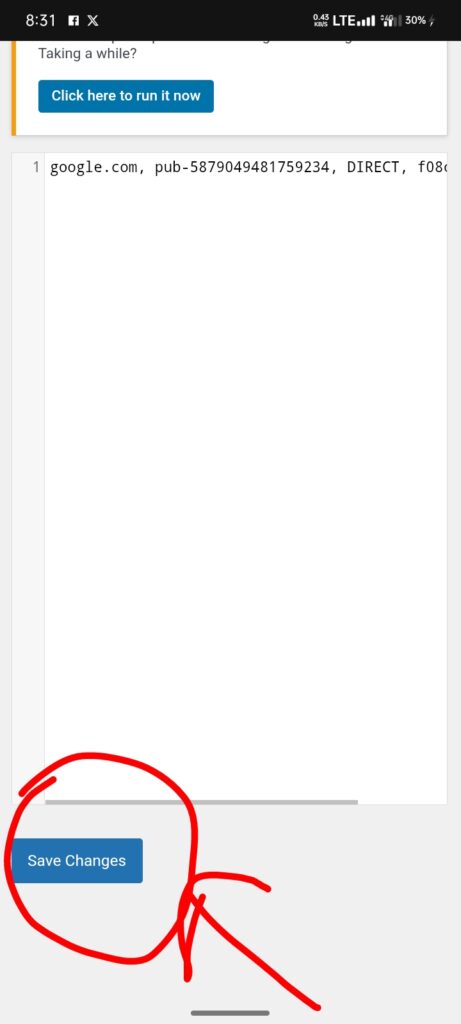
Install “Ads.txt Manager” plugin· Or use “All in One SEO” which includes ads.txt management
Error 404 – File Not Found
Cause: File missing or wrong locationFix:
Ensure file is in root directory
Check filename is exactly ads.txt (not ad.txt or ADS.TXT)
48-Hour Verification
Google AdSense: Check Diagnostics tab
Ad Serving: Monitor if ads display normally
Revenue Impact: Check for improvements in RPM/CPM
Best Practices for Optimal Results